

Keyword boosting: teaching Speech-To-Text your vocabulary
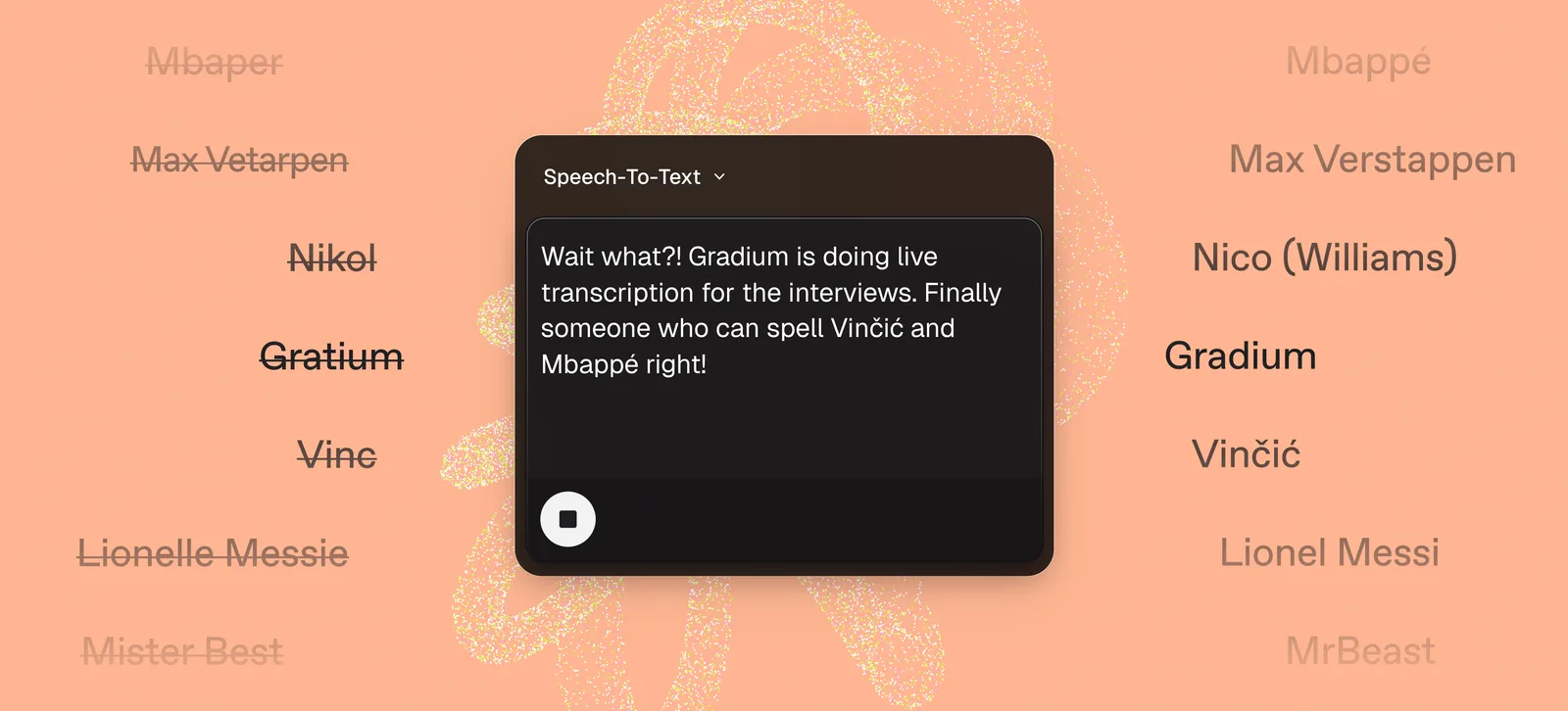
Speech-To-Text models are trained on enormous amounts of everyday speech, so they transcribe ordinary conversation at close to human accuracy. What they have rarely seen is the vocabulary specific to your product: a drug approved last month, a player who joined last season, or the name of your own company. Faced with a word it does not know well, the model falls back on a common word that sounds similar.
Keyword boosting is how you close that gap. You give the model a short dictionary of the terms you care about, and it raises their probability while decoding, in real time, with no retraining. This post explains why you need it, how the boost parameter behaves, what a sweep across hard clips says about the value to pick, and how to add it to your integration, with a sample prompt for your coding agent.
Why keyword boosting
The failure is often the same shape: rare, specific proper nouns. The model has seen the everyday name "Jamal" thousands of times and the footballer "Yamal" almost never, so when the two sound alike, the familiar spelling wins. In one of our own launch videos, the baseline transcribed the company name Gradium as "Gratium". A general model has no reason to prefer a word it has never seen over one it has, and we were pretty new at the time of the company launch.
Keyword boosting is the lever for exactly this class of word: brand and product names, drugs, athletes, places, and jargon. It does not change how the model handles ordinary speech. It makes sure the handful of words that actually carry your meaning come through.
Examples: what boosting recovers
Each of the clips below is the same audio, transcribed twice: once with no dictionary, and once with the rare term added to one. How hard the model leans toward a dictionary term is set by a single number, the boost, and every example here uses a boost of 3. Both transcripts are verified against an independent high-accuracy reference. We leaned into live sports commentary, the Tour de France and the World Cup, because it is a firehose of rare names, riders, players, and referees, that a general model has barely encountered, with medical and developer terms alongside to show the same effect outside sport.
Introducing Gratium → Gradium Phonon, our first on-device Text-To-Speech model.
Real Madrid team is Josias → Casillas, Michel Salgado, Roberto Carlos, Sergio Ramos.
Leadership at that team will rest on the shoulders of Michał Kvjetkowski → Kwiatkowski.
We are midway up the Col de la Medon → Madone in southern France.
Every one follows the same pattern: without a dictionary the model reaches for a common, similar-sounding word; with the term boosted, it commits to the name that was actually said.
Choosing the right boost parameters
We ran keyword boosting on 20 hard YouTube clips in four domains with jargon (football, cycling, medical, and tech), each transcribed in streaming mode at delay_in_frames 12 with a dictionary built from the clip's proper nouns (rare terms).
Boost is exponential. The model scores candidate words by log-probability, and the boost is added in that log domain: a boost of 3 already multiplies a keyword's odds about 20 times. Two things follow. Small numbers go a long way, and past a point the bias overwhelms the audio entirely.
Recommended: boost 3. It recovers rare vocabulary with little side effects. Treat boost 4 as the ceiling for unusually dense or foreign vocabulary, and stay away from 5 and 6 unless you are watching the output. Negative values do the reverse and are only useful to suppress a specific word you never want.
How to use it
Reach for keyword boosting whenever you can anticipate the rare, specific terms likely to come up in a session, your product and brand names, or the people and places that recur in your domain, and list them ahead of time so the model expects them.
Boosting is a single field in the setup message you send to the STT WebSocket:
{
  "language": "en",
  "delay_in_frames": 12,
  "keywords": {
    "words": ["Gradium", "Phonon", "Gradbot"],
    "boost": 3
  }
}
words is your dictionary and boost is how hard to bias toward it. Everything else stays the same. If you would rather not touch code, the same dictionary can be set in the Gradium studio under Pronunciation, in the Keyword boosts tab.
Once you save a dictionary in the studio, use it in a session by passing its id as keyword_boost_id in json_config, instead of sending an inline words list.
Two rules matter when building the dictionary, both because matching happens token by token:
- Keywords are single tokens, with no spaces. Split multi-word names, so "Ferran Torres" becomes
FerranandTorres. - Case and accents are matched exactly.
MbappéandMbappeare different keys, so include the variants you expect.
A dictionary holds up to 500 words, and every variant counts against that limit, so a name expanded into four case and accent forms uses four of the 500.
A small helper that expands every term into its case and accent variants:
import unicodedata

def expand(terms):
    strip = lambda s: "".join(c for c in unicodedata.normalize("NFKD", s)
                              if not unicodedata.combining(c))
    out = []
    for term in terms:
        for token in term.split():                 # split phrases into tokens
            for v in (token, token.lower(), strip(token), strip(token).lower()):
                if v not in out:
                    out.append(v)
    return out

expand(["Ferran Torres", "Mbappé"])
# -> ['Ferran','ferran','Torres','torres','Mbappé','mbappé','Mbappe','mbappe']
And a minimal streaming client: connect, send the setup with your dictionary, stream 24 kHz PCM, and read the text back.
import asyncio, base64, json, os, websockets

URL = "wss://api.gradium.ai/api/speech/asr"
KEY = os.environ["GRADIUM_API_KEY"]
DICT = expand(["Gradium", "Phonon", "Gradbot"])

async def transcribe(pcm):                          # pcm: int16 mono @ 24 kHz
    async with websockets.connect(URL, additional_headers=[("x-api-key", KEY)]) as ws:
        await ws.send(json.dumps({
            "type": "setup", "model_name": "default", "input_format": "pcm",
            "json_config": json.dumps({
                "language": "en",
                "delay_in_frames": 12,               # streaming, low-latency
                "keywords": {"words": DICT, "boost": 3},
            }),
        }))
        async def send():
            for i in range(0, len(pcm), 1920):       # 80 ms chunks
                await ws.send(json.dumps({"type": "audio",
                    "audio": base64.b64encode(pcm[i:i+1920].tobytes()).decode()}))
            await ws.send(json.dumps({"type": "end_of_stream"}))
        out = []
        async def recv():
            while True:
                try:
                    m = json.loads(await ws.recv())
                    if m.get("type") == "text":
                        out.append(m["text"])
                except websockets.ConnectionClosedOK:
                    break
        await asyncio.gather(send(), recv())
        return " ".join(out)
Boosting composes with everything else (language, streaming, latency tuning), and it earns its keep most in low-latency settings, where the model has less look-ahead to disambiguate a rare word on its own.
Get started
Point the STT WebSocket at a clip your current model gets wrong, add the terms it misses, and set boost 3. Add a keywords block to your setup message, or set the dictionary in the Gradium studio under Pronunciation. If you are tuning a full voice pipeline, our writeups on semantic VAD and turn-taking and optimizing quality versus latency in real-time TTS cover the neighbouring settings. Create a free account to try it on your own audio, or read the STT WebSocket reference for the full API.
Set it up with a coding agent
Would rather not write the dictionary or the client by hand? Paste the prompt below into Claude, Codex, or any coding agent, fill in your topic, and it will produce a ready-to-run Python script.
You are a senior Python engineer. Configure Gradium Speech-To-Text with keyword
boosting for the topic below and produce one runnable script.

Inputs
- Topic: <TOPIC, for example: professional cycling, its riders, teams, and Grand Tour climbs>
- API key: do NOT ask me to paste it here. The script must read it at runtime from
  the GRADIUM_API_KEY environment variable. Never hardcode it, never print or log it.

Steps
1. Build a keyword dictionary of 40 to 100 terms likely to appear in this topic that a
   general speech-to-text model rarely sees: people, brands and products, teams, drugs,
   jargon, and place names. Rules: keywords are single tokens with no spaces, so split
   multi-word names ("Ferran Torres" becomes "Ferran" and "Torres"); include the case and
   accent variants of each ("Mbappé", "Mbappe", "mbappe"); de-duplicate. Keep the raw
   terms in a TERMS list and expand them programmatically into the variant list.
2. Write one self-contained Python file (dependencies: websockets, numpy, sphn) that:
   - reads GRADIUM_API_KEY from the environment and exits with a clear message if unset;
   - takes a WAV path as the first argument and checks it exists;
   - loads it as 24 kHz mono 16-bit PCM (resample and downmix to mono if needed);
   - connects to wss://api.gradium.ai/api/speech/asr with the header x-api-key set to the
     env value;
   - sends a setup message with json_config =
     {"language": "en", "delay_in_frames": 12,
      "keywords": {"words": [ ...the expanded dictionary... ], "boost": 3}};
   - streams the audio in 1920-sample (80 ms) chunks, sends {"type": "end_of_stream"},
     reads the "text" messages, and prints the assembled transcript to stdout;
   - handles connection errors and a closed socket gracefully, with one reconnect retry.
3. Add a top-of-file docstring covering: installing the dependencies, setting
   GRADIUM_API_KEY (export in the shell, or a .env file that is gitignored), and the run
   command "python stt.py audio.wav". Do not put the key in the code or in any example.
4. If any API detail is unclear, consult the Gradium docs at docs.gradium.ai. Output only
   the finished Python file.

Constraints: boost 3; delay_in_frames 12; the API key comes only from the environment,
never from source or logs.
Related posts

Semantic VAD: turn detection that uses meaning, not silence
Acoustic VAD answers "is there a voice right now?" Semantic VAD answers "is the user done talking?" Here's why the distinction decides whether a voice agent cuts users off, how Gradium STT emits multi-horizon turn-completion predictions every 80 ms, and how to tune delay_in_frames, horizon, and flushing for your use case.

The most accurate multilingual text-to-speech, by the numbers
How we measure WER for TTS at Gradium: text normalization, jiwer alignment, results on the MiniMax Multilingual benchmark across English, French, Spanish, Portuguese and German — and why the standard metric is starting to saturate.

Optimizing Quality vs. Latency in Real-Time Text-to-Speech AI Models
Explore strategies for balancing quality and latency in real-time TTS AI models. Learn how Gradium achieves low-latency, high-quality speech synthesis for voice applications.
Frequently Asked Questions
Keyword boosting is a way to raise the probability of specific words while a Speech-To-Text model decodes, in real time and with no retraining. You pass a short dictionary of the terms you care about, such as brand and product names, drugs, athletes, places, and jargon, and the model biases toward them so rare proper nouns come through correctly instead of being replaced by a common word that sounds similar.
Add a keywords block to the setup message you send to the STT WebSocket, with a words list (your dictionary) and a boost value, for example boost 3. Keywords must be single tokens with no spaces, so split multi-word names, and case and accents are matched exactly, so include the variants you expect. You can also save a dictionary in the Gradium studio under Pronunciation and reference it by passing keyword_boost_id in json_config.