

Which voices sound good on a phone call?
Our users noticed that some voices lose their character on phone calls. We dug into why and ran a listening test to find the ones that hold up.
Most voice agents talk to people over the phone. A phone line carries 8,000 audio samples per second, while Gradium voices play at 48 kHz in Studio. So the voice your callers hear is a compressed version of the one you picked in the demo, and some voices come through that compression much better than others.
This one started with a customer. Calldesk, which runs phone agents on Gradium, told us that a voice can sound great in Studio and still lose some of what makes it pleasant once it goes through a call. It's something you hear on a real call long before anyone measures it.
We'll quickly need a voice design specific to our phone channel, because there's always a gap between the 48 kHz voice preview and the reality of an 8 kHz phone call.

We had a fix out in under a week. We tested our voices at phone quality with human listeners, kept the ones they preferred, and added a filter to find them in Gradium Studio and the API. Most of what we ship starts this way, with a message from someone building on Gradium. If something doesn't sound right in your product, tell us: it's the fastest way to get it fixed.
Hear the difference
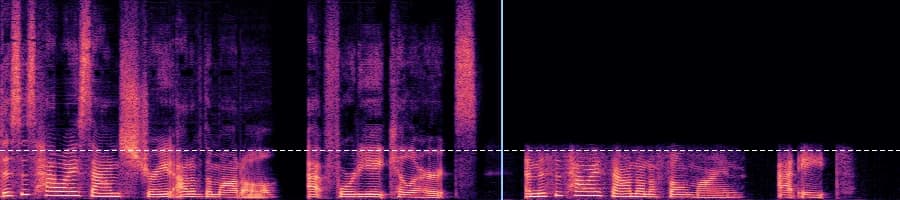
Here is Nora, one of the voices listeners shortlisted for the Telephony list. Halfway through, the audio switches from full quality to phone quality.
 4 kHz
This is how I sound straight out of the model at 48 kHz, and this is how I sound on a phone line at 8.
The words stay clear after the switch. What changes is the texture. The voice sounds thinner, and the sense that someone is speaking close to you fades. In the picture, everything above the dashed 4 kHz line disappears at the switch. For some voices the change is small. For others, it removes most of what made them a good choice.
What a phone line does to a voice
8 kHz and μ-law, in plain words
The phone network still runs on a standard from 1972 called G.711.[1] It samples audio 8,000 times per second (8 kHz) and stores each sample in 8 bits, using a logarithmic curve called μ-law in North America and Japan, and A-law in most other countries. Most telephony platforms that voice agents connect to stream audio in this format, whatever quality the TTS produced.
A sampling rate of 8 kHz can only carry frequencies up to 4 kHz, and in practice the classic phone band runs from about 300 Hz to 3,400 Hz. Human speech reaches well above that. The phone band keeps the vowels and most of what makes words intelligible, and it drops the upper range where a lot of a voice's character lives.
What gets lost
Above 4 kHz you find the hiss of "s" and "f" and the breathiness that makes a soft voice feel close and present. A voice that relies on those qualities to sound warm or intimate loses more on a call than a voice whose character sits lower in the spectrum. Voice agent guides often recommend mid-range voices for this reason.
Why an agent can't send better audio
Sending higher-quality audio doesn't help, because the network converts it to 8 kHz before it reaches the caller. Generating a bigger file also costs time, and in a live conversation every extra millisecond is silence on the line. The practical choice for a phone agent is the voice, since the format is already fixed.
The Gradium API can return audio directly in phone format, for example 8 kHz μ-law by setting output_format to ulaw_8000. The recommended formats are listed in our telephony guide.
Why we tested with listeners instead of a metric
The obvious first idea is to measure each voice and predict which ones survive compression. We tried that. We compared the listener rankings with acoustic properties of each voice, such as pitch, and found no measurement that predicted what people preferred.
That result matches what speech researchers keep finding. Listening tests remain the gold standard for evaluating synthetic speech,[2] and classic objective measures such as PESQ correlate only weakly with how natural people find a voice.[3] Researchers are working on automatic metrics that track human judgment more closely,[4] but for a question as specific as which voice you want to hear on a call, the reliable test is still a person listening.
A phone call ends with a person listening, so we asked people.
How we ran the test
We started with a selection of the voices we already recommend at full quality, converted their audio to phone quality, and asked native-speaker listeners which voices they would rather hear on a call. We ran one test per language and gender, in US English, French, German, Brazilian Portuguese, and Spanish from both Spain and Mexico. In each test, we kept the five voices listeners preferred, 60 in total.
Listener preferences always carry some uncertainty, so we didn't read too much into exact positions. We kept the voices that listeners placed near the top consistently, which is also why the list isn't ranked.
What we found
For some voices, the order at phone quality looked very different from the order at full quality. In the English test, one male voice that sounds excellent in Studio ranked near the bottom at phone quality, because listeners heard it as muffled once compressed. Another English male voice ranked near the top.
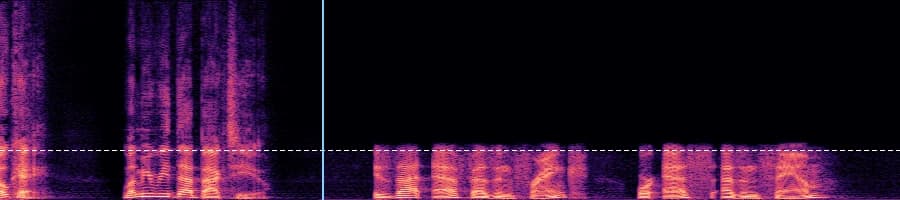
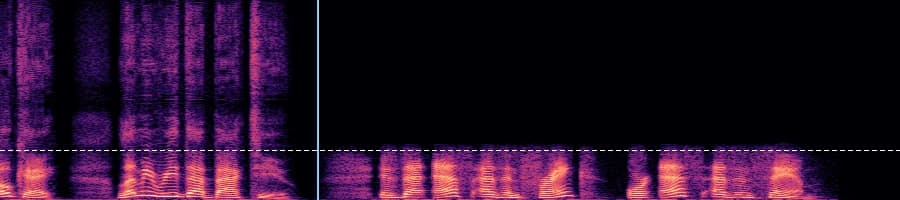
Here is the same read-back line from two male voices in that test, the kind of line a phone agent says every day. Each one starts at full quality and switches to the phone line on the question. Listen to how clearly "F as in Frank" and "S as in Sam" come through after the switch.
 4 kHz
Okay, let me read that back to you. Is that F as in Frank, or S as in Sam?
 4 kHz
Okay, let me read that back to you. Is that F as in Frank, or S as in Sam?
None of this makes the other voices bad. Every voice in the test is one we already recommend at full quality, and the test only tells us which voices listeners preferred next to the others in their group. The shortlist shows which ones people still preferred after the phone line had its say.
Find phone-ready voices in Studio, the MCP, and the API
In Gradium Studio, open the filters in the voice catalog and set Channel to Telephony. Typing "telephony," "phone line," "phone call," "landline," or "8 kHz" in the catalog search offers the same filter. You can add Language or Accent on top. The catalog then shows only the voices listeners approved for phone calls. The list isn't ranked: every voice in it passed the test, so pick the one that fits your brand and your callers.
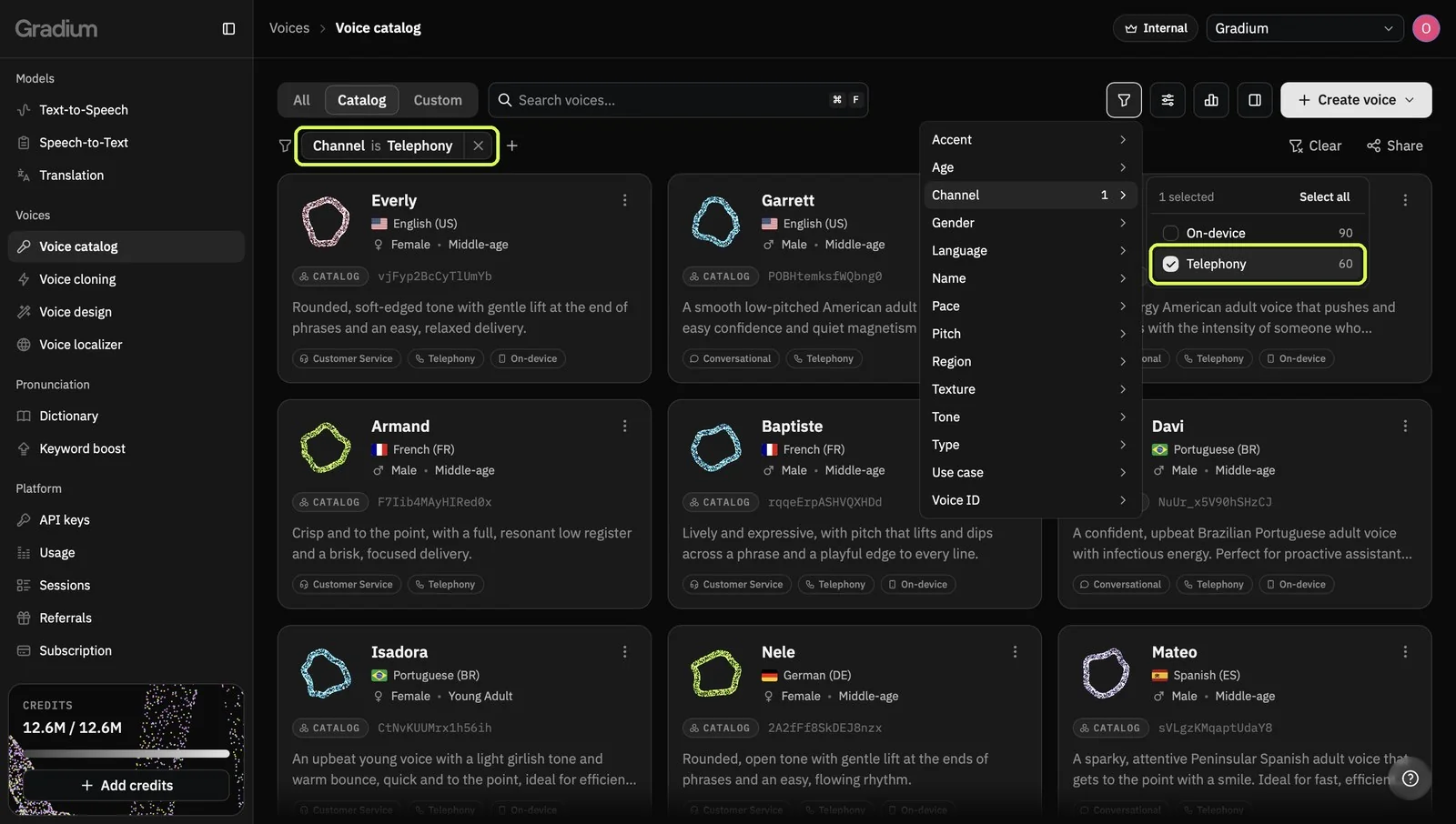
The same filter works in the API, so your code can pull the phone-ready catalog directly. Add channel=telephony to the voices request, together with include_catalog=true:
curl -G "https://api.gradium.ai/api/voices/" \-d include_catalog=true \-d channel=telephony \-d locale=en-us \-H "x-api-key: $GRADIUM_API_KEY"
Then ask for audio that's already in phone format when you open the TTS session, so nothing gets converted on the way:
{"type": "setup","voice_id": "Bla6SbVMczYnOhfK","output_format": "ulaw_8000"}
Working from a coding agent? The Gradium MCP lets Claude Code, Codex, or any other MCP client browse the voice catalog and recommend voices for you, without leaving your session. Its list_voices tool takes the same filter as its channel argument. Tell your agent the voice is for phone calls, in the same words Studio's search maps to the Telephony filter:
Find me a calm, female US English voice for our phone support agent.It has to hold up on a phone line: telephony, 8 kHz.Shortlist three and read each one this line:"Thanks for calling. Can I have your order number?"
The agent then asks the catalog for phone-ready voices only:
{"tool": "list_voices","arguments": {"locale": "en-us","gender": "female","channel": "telephony"}}
To connect it, add https://mcp.gradium.ai/mcp to your client. The MCP guide walks through the setup.
Choosing a voice for your phone agent
The filter narrows the catalog to voices that hold up on a call. A few habits help you choose among them.
- Listen through a real call. Play your shortlist through your telephony provider to an actual phone, with your agent's real script, before you decide. Studio headphones flatter every voice.
- Match the accent to your callers. A familiar accent is easier to follow on a compressed line. The Telephony filter combines with the Language and Accent filters, so you can do both at once.
- Prefer a steady voice for long calls. A very expressive voice can win a demo and tire a caller over a ten-minute support call.
- Tell us when a voice surprises you. If a voice from the list doesn't work on your line, or one outside it sounds great, we want to know. This list started with that kind of message, so share your feedback.
Try it
The Telephony filter is live in Gradium Studio and the API today.
Thanks to the Calldesk team for raising this, and to everyone who took part in the listening test. Try a phone-ready voice on your next call, and tell us what you hear.
References
- ITU-T, “Pulse code modulation (PCM) of voice frequencies,” Recommendation G.711, 1972.
- W.-C. Huang et al., “The VoiceMOS Challenge 2022,” in Proc. Interspeech, 2022.
- “Neural networks for Text-to-Speech evaluation,” arXiv:2604.08562, 2026.
- C. Minixhofer et al., “TTSDS2: Resources and benchmark for evaluating human-quality text to speech systems,” arXiv:2506.19441, 2025.
Related posts
How do you describe a voice? What we learned from designing 16k of them
To build the Gradium voice catalog, we designed more than 16,000 voices from written descriptions and kept about 1,400. Here is what that taught us about describing a voice: the five parts of a good prompt, which words the model hears reliably, and why the script does the acting, with samples you can play side by side.

Giving voice agents a voice that adapts to context
Most voice agents speak with one preselected voice, whoever is on the line. Once a voice can be created from a text description, the voice becomes another property your code computes from context. This article builds the full pipeline: classify the message, map the signals to a Voice Design prompt, resolve it to an approved voice on the hot path, and design the missing ones in the background.

Launching Voice Design: prompt the voice your agent needs
Developers building voice agents ask us for voices matched to the use case in front of them: a Québécoise receptionist for a Montréal dealership, a Paulista support agent for a São Paulo fintech, a narrator in his sixties with the authority of a lecture hall. Briefs outnumber any catalog. Voice Design starts from a prompt: write one or two sentences, get complete new voices back in seconds, keep the one you want.
Frequently Asked Questions
Most phone calls carry 8 kHz audio encoded with G.711, using μ-law in North America and Japan and A-law in most other countries. That format keeps frequencies up to about 3.4 kHz and drops everything above.
No. Every Gradium voice works on a phone line. The list shows the voices that listeners still preferred after compression, which makes it a good place to start.
No. Listener preferences carry some uncertainty, so we treat every voice on the list as approved rather than publishing an order.
We compared our listener results with acoustic measurements and found no measurement that predicted preference. Research on speech evaluation points the same way: listening tests remain the reference, and classic objective metrics correlate weakly with perceived naturalness.
No. The test covered a selection of our recommended catalog voices, so voices you design or clone aren't in the list. Before you use one on a phone line, listen to it through a real call.
US English, French, German, Brazilian Portuguese, and Spanish from both Spain and Mexico.