
By Gradium. Data as of September 2026.
Key takeaways
- Multiplexing reuses one WebSocket connection for many independent synthesis requests, instead of opening and closing one per generation.
- Three fields do the work:
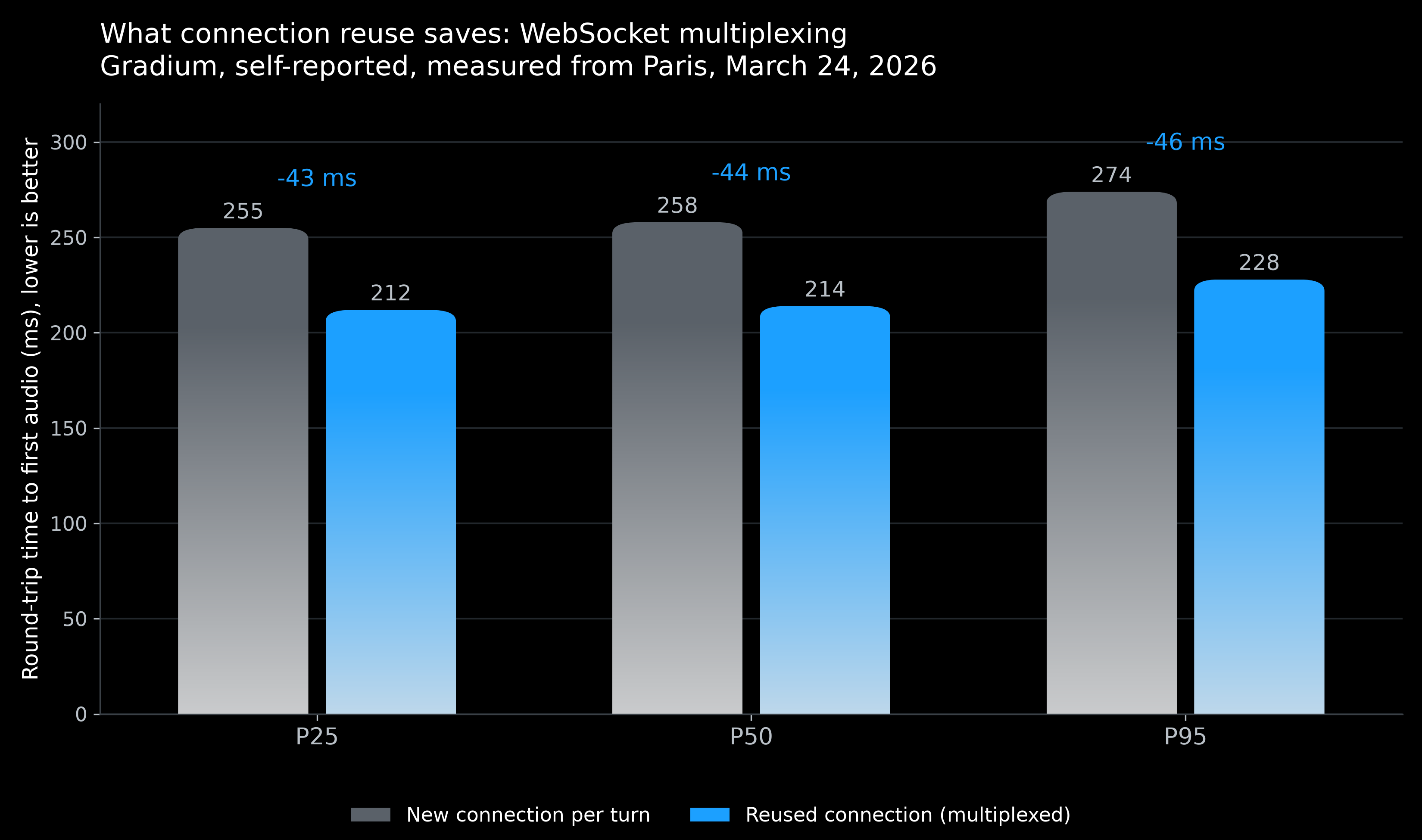
close_ws_on_eos: falseon setup,client_request_idon every message you send, andclient_req_idon every message you receive. - Gradium's March 2026 measurement put the saving at about 44 ms at the median: 258 ms per-turn round trip against 214 ms on a reused connection.
- Public leaderboards do not show this. Coval excludes the TLS and WebSocket handshake uniformly, roughly 50 to 200 ms, so a per-turn connection costs you time no benchmark charges you for.
- It matters for back-to-back short turns. For a single long generation, the handshake is noise.
What is multiplexing?
The standard flow is one connection per generation: open a WebSocket, send text, receive audio, the server closes it at end of stream. For most applications that is fine.
For a voice agent producing short responses back to back, it is not. Every turn pays a TCP and TLS handshake plus the WebSocket upgrade before a single byte of text is sent. Multiplexing sends multiple independent requests over one persistent connection instead. Each runs as its own generation, and their audio chunks can arrive interleaved on the same channel.
Two things you stop paying for: the repeated handshake, and the bookkeeping of many simultaneous connections.
What does it save?
Gradium measured it directly. In the Time to First Audio benchmark of March 24, 2026, run from Paris over 100 queries per model with a warm state, round-trip time to first audio was 258 ms P50 including connection establishment and 214 ms P50 excluding it. About 44 ms at the median, and the same shape at P25 and P95.
Source: Gradium, "Time to First Audio", March 24, 2026, self-reported, measured from Paris. Round-trip figures from before the Coval methodology change of June 3, 2026.
| Measurement | P25 | P50 | P95 |
|---|---|---|---|
| Including connection setup | 255 ms | 258 ms | 274 ms |
| Excluding connection setup (multiplexed) | 212 ms | 214 ms | 228 ms |
Put that against the turn budget. Human conversation changes hands in about 208 ms on average across ten languages (Stivers et al., PNAS, 2009), and Gradium's guidance puts the synthesis stage at 200 to 300 ms. Forty-four milliseconds is a fifth of that budget, recovered by a configuration change.
It is also a cost no public benchmark will show you. Coval excludes the pre-connection handshake uniformly across every model, roughly 50 to 200 ms depending on network position, precisely so the board compares synthesis rather than connection setup. If your agent opens a connection per turn, add it back to every number you read there. See TTS latency benchmark 2026. For how these Coval latency figures are measured since June 3, 2026, see How a benchmark change produced a faster TTS model.
How does it work in Gradium?
1. Open one connection, run two tasks
Open a single WebSocket and run two coroutines concurrently on it: one that sends requests, one that receives audio. They must be concurrent, because chunks for a later request can arrive while an earlier one is still streaming.
2. Stop the server closing the socket
By default the server closes the connection at end of stream. Set close_ws_on_eos to false on the setup message to keep it open:
{
  "type": "setup",
  "voice_id": "<VOICE_ID>",
  "model_name": "default",
  "output_format": "wav",
  "close_ws_on_eos": false,
  "json_config": {
    "rewrite_rules": "en"
  }
}
3. Tag every message you send
Since several generations share one channel, each needs an identifier. Put a unique client_request_id on every message you send, including the setup message and the end_of_stream signal. Any string works.
import asyncio
import json

async def send(ws, request_id: str, text: str, voice_id: str):
    """Open one generation on a shared connection."""
    await ws.send(json.dumps({
        "type": "setup",
        "client_request_id": request_id,
        "voice_id": voice_id,
        "model_name": "default",
        "output_format": "wav",
        "close_ws_on_eos": False,
        "json_config": {"rewrite_rules": "en"},
    }))
    await ws.send(json.dumps({
        "type": "text",
        "client_request_id": request_id,
        "text": text,
    }))
    await ws.send(json.dumps({
        "type": "end_of_stream",
        "client_request_id": request_id,
    }))
4. Route incoming audio by client_req_id
On the receiving side, read client_req_id off each message and append the chunk to the right buffer. Note the field name differs by direction: you send client_request_id, you receive client_req_id.
async def receive(ws, expected: int) -> dict[str, bytearray]:
    """Collect interleaved audio until every generation has ended."""
    buffers: dict[str, bytearray] = {}
    finished: set[str] = set()

    async for raw in ws:
        message = json.loads(raw)
        request_id = message["client_req_id"]

        if message["type"] == "audio":
            buffers.setdefault(request_id, bytearray()).extend(
                bytes.fromhex(message["data"])
            )
        elif message["type"] == "end_of_stream":
            finished.add(request_id)
            if len(finished) == expected:
                break

    return buffers
5. Disconnect when every generation is done
Track completions and close once the count matches what you sent. The example above breaks out of the receive loop on that condition; the connection is closed by the surrounding context manager.
async def main():
    voice_id = "<VOICE_ID>"
    jobs = {
        "blue": "Your order ships on Friday.",
        "red": "Your confirmation code is AB12CD34.",
    }

    async with open_gradium_ws() as ws:  # your WebSocket client
        receiver = asyncio.create_task(receive(ws, expected=len(jobs)))
        for request_id, text in jobs.items():
            await send(ws, request_id, text, voice_id)
        audio = await receiver

    for request_id, data in audio.items():
        with open(f"{request_id}.wav", "wb") as f:
            f.write(data)

asyncio.run(main())
The parameters, at a glance
| Parameter | Direction | Where | What it does |
|---|---|---|---|
close_ws_on_eos |
sent | setup message | false keeps the connection open after a generation ends |
client_request_id |
sent | every message | Unique string tagging the generation a message belongs to |
client_req_id |
received | every message | Identifies which generation an incoming chunk belongs to |
When is it worth it?
| One connection per generation | Multiplexed | |
|---|---|---|
| Connections | One per generation | One for all |
| Handshake cost | Paid every turn | Paid once |
| Connection management | Many to track | One |
| Client complexity | Lower | Two concurrent tasks and a routing table |
| Best for | Single or infrequent requests | Back-to-back short turns |
The honest tradeoff: multiplexing adds concurrency to your client. You now need two tasks and a per-request buffer, and a bug in the routing shows up as one generation's audio appearing inside another's file. For a batch job that renders one long file, that complexity buys nothing, because the handshake is a rounding error against a multi-minute generation.
For a live agent it is the cheapest latency win available, and it is available before you change model, provider or anything else about the pipeline.
Two operational limits to plan for. Gradium's session limit is 3,000 seconds, or 50 minutes, so a long-lived connection needs a reconnect path. And concurrency is capped by plan: 2, 5, 5, 10 and 15 concurrent Text-to-Speech streams on Free through L, custom on Enterprise. Multiplexing does not raise that ceiling; it removes the handshake beneath it.
Common failure modes
Four things go wrong, and each has a recognisable signature.
The connection closes after the first generation. close_ws_on_eos is missing or true. The first request succeeds and every later send fails on a closed socket.
Audio from two generations lands in one file. A message went out without a client_request_id, or the receiver is keying on the wrong field. Remember the asymmetry: you send client_request_id and you receive client_req_id.
The client hangs at the end. The receive loop is counting end_of_stream messages but one generation errored instead of ending cleanly. Count terminal events of either kind, and put a timeout on the wait.
Everything works in testing and stalls under load. You have hit the plan's concurrency ceiling, not a multiplexing bug. Gradium allows 2, 5, 5, 10 and 15 concurrent Text-to-Speech streams from Free through L. One connection carrying ten generations still counts as ten streams.
A fifth, slower failure: the 3,000-second session limit arrives and the connection drops mid-conversation. Long-lived agents need a reconnect path that re-sends setup, not just a retry on the failed generation.
Glossary
Multiplexing. Carrying several independent synthesis requests over one persistent WebSocket connection, with responses interleaved and routed by request id.
close_ws_on_eos. The setup-message field controlling whether the server closes the connection at end of stream. Set false to reuse it.
client_request_id. The identifier you attach to every message you send, tagging which generation it belongs to.
client_req_id. The identifier on every message you receive. Same purpose, different field name by direction.
End of stream. The message marking one generation complete. On a multiplexed connection it ends that generation, not the connection.
Handshake. TCP, TLS and the WebSocket upgrade, paid before any text is sent. Roughly 50 to 200 ms, and excluded from the Coval leaderboard.
Session limit. The maximum life of one Gradium connection: 3,000 seconds, for both Text-to-Speech and Speech-to-Text.
Related guides
Part of the latency and streaming cluster, hub at best low-latency TTS APIs 2026. Its siblings:
- Best low-latency TTS APIs 2026: the cluster hub, the whole turn budget.
- Streaming TTS audio in real time: the transport this builds on.
- Connecting Text-to-Speech to an LLM pipeline: interleaving the LLM with synthesis, the other large latency win.
- json_config for Gradium TTS and STT: the rest of the setup message.
- TTS latency benchmark 2026: why the handshake is missing from the public board.
- Turn-taking and VAD in voice agents: the stage upstream, where most perceived delay lives.
- Adding Text-to-Speech to an app or website: the four integration paths, of which this is an optimization of the first.
Beyond this topic
Latency is only worth optimizing if the words come out right. TTS WER benchmark 2026 covers accuracy, and voice AI APIs for phone-based agents covers the deployment where both constraints bind hardest.
Gradium's free tier includes 45,000 credits per month with no credit card. API reference and quickstarts are at docs.gradium.ai. For enterprise evaluations, use our contact form.